본 글은 한국어로 작성되었으며, 글 하단에서 영문 번역본을 확인하실 수 있습니다.
(Scroll down to the bottom for the English version of this post.)

수시로 울리는 푸시 알림 차단과 앱 알림 끄기를 실천하지 못해 주의집중 흐름이 끊기고 심각한 알림 스트레스를 호소하는 현대인이 급증하고 있습니다.
스마트폰 의존도가 높아질수록 아무런 연락이 오지 않았음에도 진동을 느끼는 유령 진동 증후군과 같은 스마트폰 부작용을 겪게 됩니다.
본 가이드에서는 알림이 뇌 피로에 미치는 영향을 분석하고, 디지털 디톡스를 통해 집중 모드를 활성화하여 업무 효율성을 높이는 3가지 행동 수칙을 제시합니다.
“띵동” 소리에 중독된 뇌, 알림 스트레스가 유발하는 전두엽 과부하
우리는 하루 평균 수백 번에 달하는 각종 푸시 알림의 홍수 속에서 살아가고 있으며 이는 뇌 과학적으로 심각한 주의력 분산을 야기합니다.
앱 알림 끄기가 제대로 이루어지지 않은 스마트폰은 끊임없이 도파민 분비를 자극하여 사용자가 기기에 종속되도록 만드는 미디어 중독의 온상이 됩니다.
“띵동” 하는 소리나 짧은 진동은 작업에 몰두하던 뇌의 흐름을 순간적으로 가로채며, 한 번 깨진 집중력을 다시 회복하는 데는 평균 23분의 시간이 소요됩니다.
이러한 알림 스트레스가 반복되면 뇌는 항상 대기 상태를 유지하게 되어 만성적인 뇌 피로를 겪고 심각한 집중력 향상 저하를 맞이하게 됩니다.
결과적으로 아무런 자극이 없음에도 손을 주머니로 가져가는 유령 진동 증후군을 겪거나, 업무 효율성이 급격히 떨어지는 현대인 고질병으로 발현됩니다.
스마트폰에 지배당하지 않고 내 삶의 주도권을 되찾기 위해서는 디지털 웰니스 관점에서 알림 환경을 완전히 재설계하는 강도 높은 디지털 디톡스가 필수적입니다.
의지만으로 화면을 보지 않으려는 노력은 한계가 있으므로, 기기 자체를 제어하여 스마트폰 중독 해결방안을 시스템적으로 정착시켜야 합니다.
지금부터 일상에서 즉시 적용할 수 있는 스마트폰 알림 설정 방법과 폰 다이어트를 위한 핵심 행동 수칙 3가지를 구체적으로 알아보겠습니다.
알림의 지배에서 벗어나 집중력을 높이는 행동 수칙 3가지
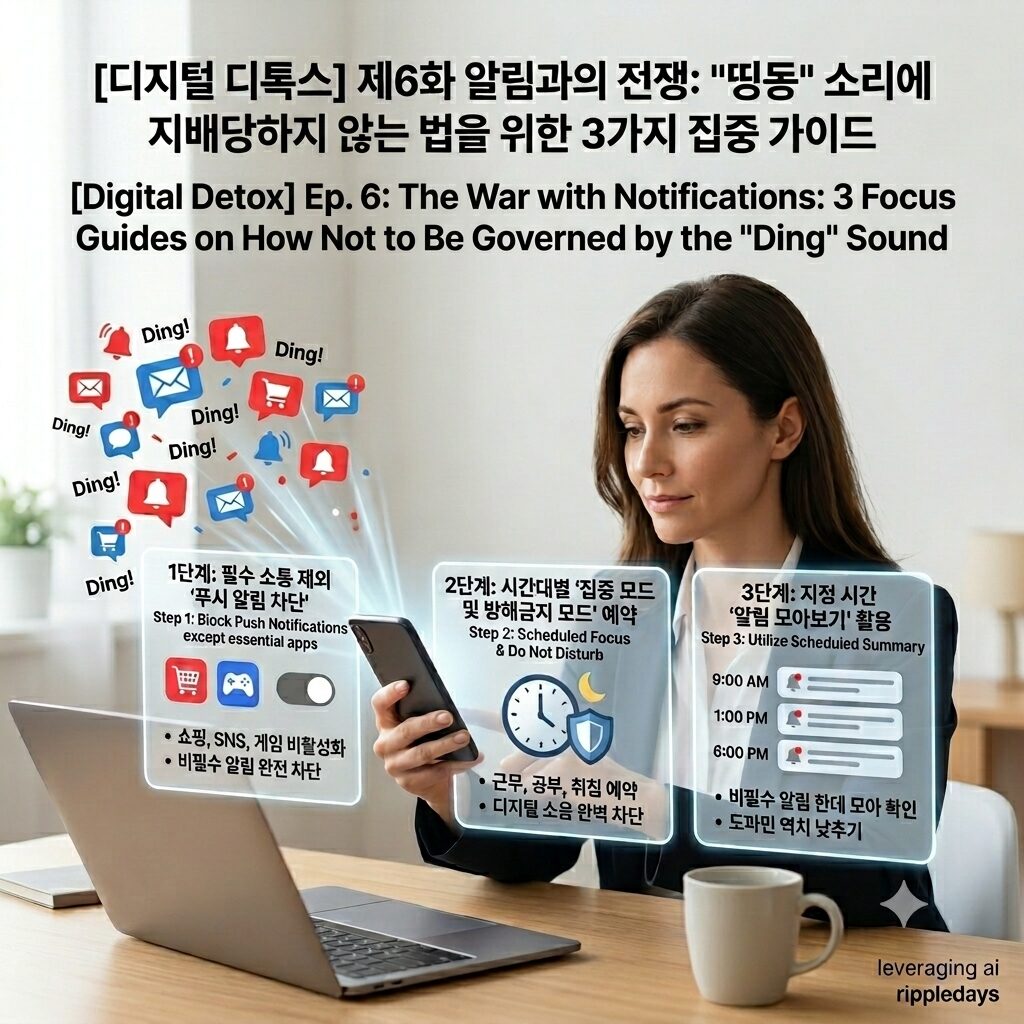
1단계: 필수 소통 앱을 제외한 모든 앱의 ‘푸시 알림 차단’하기
업무용 메신저나 긴급한 전화를 제외한 쇼핑, 게임, SNS, 미디어 앱의 알림은 뇌를 자극하여 스마트폰 중독을 유발하는 가장 큰 요인입니다.
스마트폰 설정 메뉴에 진입하여 내 생존이나 생업에 직결되지 않는 모든 서드파티 앱의 알림 권한을 완전히 비활성화하십시오.
단순히 소리를 무음으로 바꾸는 것에 그치지 않고 화면에 배지가 표시되거나 팝업이 뜨는 시각적 자극까지 완벽히 차단해야 합니다.
내가 원할 때만 앱을 열어 정보를 확인하는 능동적 소비 구조로 전환하면 무의식적인 화면 확인 횟수를 획기적으로 줄여 뇌 휴식을 확보할 수 있습니다.
2단계: 시간대별 기기 제어를 위한 ‘집중 모드 및 방해금지 모드’ 예약 설정하기
근무 시간이나 독서 시간, 그리고 취침 직전의 시간대에는 외부의 디지털 소음이 완벽히 차단되는 청정 환경을 예약 기능을 통해 구축해야 합니다.
아이폰이나 갤럭시 등 스마트폰이 자체적으로 제공하는 집중 모드 또는 방해금지 모드 기능을 활용하여 특정 시간대에 알림이 울리지 않도록 설정하십시오.
화이트리스트 기능을 활용해 지정한 가족의 연락이나 필수 업무 연락만 예외적으로 허용해 두면 긴급 상황에 대한 불안감 없이 일상에 몰두할 수 있습니다.
시스템이 보장하는 고요함은 파편화된 주의력을 하나로 모아주어 업무 효율성을 극대화하고 깊은 생각에 잠길 수 있는 생각하는 힘을 길러줍니다.
3단계: 알림을 한데 모아 확인하는 ‘지정 시간 알림 모아보기’ 활용하기
수시로 날아오는 메시지에 실시간으로 답장하는 버릇은 업무 효율성을 저해하고 뇌를 정보 과부하 상태로 몰아넣는 스마트폰 의존도의 주범입니다.
기기 자체 기능을 활용하여 비필수적인 알림들이 실시간으로 울리지 않고, 오전 9시, 오후 1시, 오후 6시 등 지정된 시간에만 모아서 나타나도록 설정하십시오.
알림을 확인하는 시간의 주기를 인위적으로 격리하면 메신저 감옥에서 벗어나 내 업무와 휴식의 템포를 스스로 조절할 수 있게 됩니다.
정해진 시간에만 디지털 세상과 연결되는 폰 다이어트 습관은 도파민 역치를 낮추어 일상에서 체감하는 뇌 건강 관리에 결정적인 기여를 합니다.
성공적인 알림 다이어트를 위한 ‘3분 체크리스트’
하루의 마무리에 아래 체크리스트를 확인하며 오늘 하루 얼마나 디지털 디톡스를 잘 실천했는지 점검해 보십시오.
- 전화와 업무 필수 메신저를 제외한 SNS, 쇼핑, 게임 등 비필수 앱의 푸시 알림을 90% 이상 비활성화했는가?
- 업무나 공부 등 깊은 몰입이 필요한 시간에 스마트폰의 집중 모드나 방해금지 모드를 적극적으로 활성화했는가?
- 알림 소리나 진동이 울렸을 때 하던 일을 즉시 멈추지 않고 하던 작업을 마무리한 뒤 여유 있게 확인했는가?
- 아무런 알림이 오지 않았음에도 손을 주머니로 가져가거나 화면을 켜서 확인하는 유령 진동 증후군을 절제했는가?
- 메시지가 올 때마다 실시간으로 답장하는 대신 내가 정한 특정 시간에만 메신저를 확인하고 소통했는가?
ripple point
스마트폰의 알림은 내 시간이 아닌 타인의 시간에 나를 맞추라는 신호입니다. 비필수 알림을 차단할 때 비로소 내 온전한 하루가 시작됩니다.
제5화 불을 꺼도 끝나지 않는 낮: 블루라이트와 불면의 밤을 극복하는 3가지 숙면 가이드
Hashtag
#앱알림끄기 #집중모드 #디지털디톡스 #스마트폰중독 #스마트폰알림설정 #푸시알림차단 #뇌휴식 #집중력향상 #스크린타임 #스마트폰의존도 #현대인고질병 #디지털웰니스 #미디어중독 #알림스트레스 #도파민중독 #유령진동증후군 #업무효율성 #뇌피로해소 #폰다이어트 #스마트폰중독해결방안
English Version Available Below
Ep. 6: The War with Notifications: 3 Focus Guides on How Not to Be Governed by the “Ding” Sound
An increasing number of modern individuals are suffering from fragmented attention spans and severe notification stress due to their failure to implement push notification blocking and turn off app notifications.
As smartphone dependency increases, people experience smartphone side effects such as phantom vibration syndrome, where they feel a vibration even when no communication has arrived.
In this guide, we analyze the impact of notifications on brain fatigue and present three action rules to boost work efficiency by activating focus mode through digital detox.
The Brain Addicted to the “Ding” Sound: Prefrontal Cortex Overload Caused by Notification Stress
We live in a flood of various push notifications that average hundreds of times a day, which causes a serious scientific disruption of attention in the brain.
A smartphone where turning off app notifications is not properly implemented becomes a hotbed of media addiction that constantly stimulates dopamine secretion, making users subordinate to the device.
The “ding” sound or brief vibration instantly hijacks the flow of the brain that was immersed in a task, and it takes an average of 23 minutes to recover that broken concentration.
When this notification stress is repeated, the brain is forced to maintain an alert state at all times, leading to chronic brain fatigue and a severe decline in concentration improvement.
Consequently, this manifests as a common modern ailment where individuals experience phantom vibration syndrome—reaching for their pockets even when there is no stimulus—or experience a sharp drop in work efficiency.
To avoid being governed by smartphones and to regain sovereignty over life, intensive digital detox that completely redesigns the notification environment from a digital wellness perspective is essential.
Since efforts to avoid looking at the screen by willpower alone have limits, the smartphone addiction solution must be systematically settled by controlling the device itself.
Below, we will examine in detail three core action rules for configuring smartphone notification settings and practicing a phone diet that can be immediately applied to daily life.
3 Action Steps to Break Free from the Governance of Notifications and Boost Focus
Step 1: ‘Block Push Notifications’ for All Apps Except Essential Communication Apps
Notifications from shopping, gaming, social media, and media apps—excluding work messengers or urgent phone calls—are the biggest factors that stimulate the brain and cause smartphone addiction.
Enter the smartphone settings menu and completely disable notification permissions for all third-party apps that are not directly linked to your survival or livelihood.
Do not stop at simply muting the sound; you must completely block visual stimuli, such as badges appearing on the screen or pop-ups emerging.
Switching to an active consumption structure where you open apps to check information only when you want to can drastically reduce the number of unconscious screen checks and secure brain rest.
Step 2: Schedule ‘Focus Mode and Do Not Disturb Mode’ for Time-Specific Device Control
During working hours, reading hours, and right before bedtime, a clean environment where external digital noise is completely blocked must be established through scheduling features.
Utilize the Focus Mode or Do Not Disturb features inherently provided by smartphones like iPhone or Galaxy to prevent notifications from sounding during specific time frames.
By utilizing the whitelist feature to exceptionally allow contact from designated family members or essential work contacts, you can immerse yourself in daily life without anxiety about emergency situations.
The tranquility guaranteed by the system gathers fragmented attention into one, maximizing work efficiency and cultivating the power of thought to sink into deep contemplation.
Step 3: Utilize ‘Scheduled Summary’ to Gather and Check Notifications Together
The habit of replying in real time to messages that fly in at any moment is a primary culprit of smartphone dependency that degrades work efficiency and pushes the brain into a state of information overload.
Utilize the device’s native features so that non-essential notifications do not sound in real time, but are gathered and displayed only at designated times, such as 9 AM, 1 PM, and 6 PM.
Artificially isolating the cycle of checking notifications allows you to escape the messenger prison and regulate the tempo of your own work and rest.
The phone diet habit of connecting with the digital world only at fixed times lowers the dopamine threshold, contributing decisively to brain health management experienced in daily life.
A 3-Minute Checklist for a Successful Notification Diet
At the end of the day, review the checklist below to check how well you have practiced digital detox today.
- Did you disable more than 90% of push notifications for non-essential apps including social media, shopping, and games, excluding phone calls and essential work messengers?
- Did you actively activate the smartphone’s Focus Mode or Do Not Disturb Mode during times when deep immersion is required, such as working or studying?
- When a notification sound or vibration rang, did you finish the task you were doing and check it with leisure, rather than stopping your work immediately?
- Did you restrain yourself from phantom vibration syndrome—reaching into your pocket or turning on the screen to check even when no notification arrived?
- Instead of replying in real time whenever a message arrived, did you check the messenger and communicate only at specific times you set?
| Recommended Step | Implementation Method | Intended Outcome | Expected Benefit | Target Audience |
| Step 1: Push Block | Turn off third-party app notifications | Active information consumption | Drastic drop in screen checks | Chronic notification checkers |
| Step 2: Scheduled Focus | Auto-activate Do Not Disturb mode | Complete block of digital noise | Maximum work immersion | Professionals & Students |
| Step 3: Summary View | Group notifications at fixed times | Isolation of communication cycles | Lowered dopamine threshold | Real-time reply obsessors |
ripple point
Smartphone notifications are a signal to adjust yourself to other people’s time, not your own. Your intact day truly begins only when you block non-essential notifications.
Ep. 5: The Night That Doesn’t End Even When Lights Are Out: 3 Sleep Guides to Overcome Blue Light and Insomnia
Hashtag
#appnotificationoff #focusmode #digitaldetox #smartphoneaddiction #smartphonenotification #pushnotificationblocking #brainrest #concentrationimprovement #screentime #smartphonedependency #modernailment #digitalwellness #mediaaddiction #notificationstress #dopamineaddiction #phantomvibrationsyndrome #workefficiency #brainfatiguetreatment #phonediet #smartphoneaddictionsolution