본 글은 한국어로 작성되었으며, 글 하단에서 영문 번역본을 확인하실 수 있습니다.
(Scroll down to the bottom for the English version of this post.)

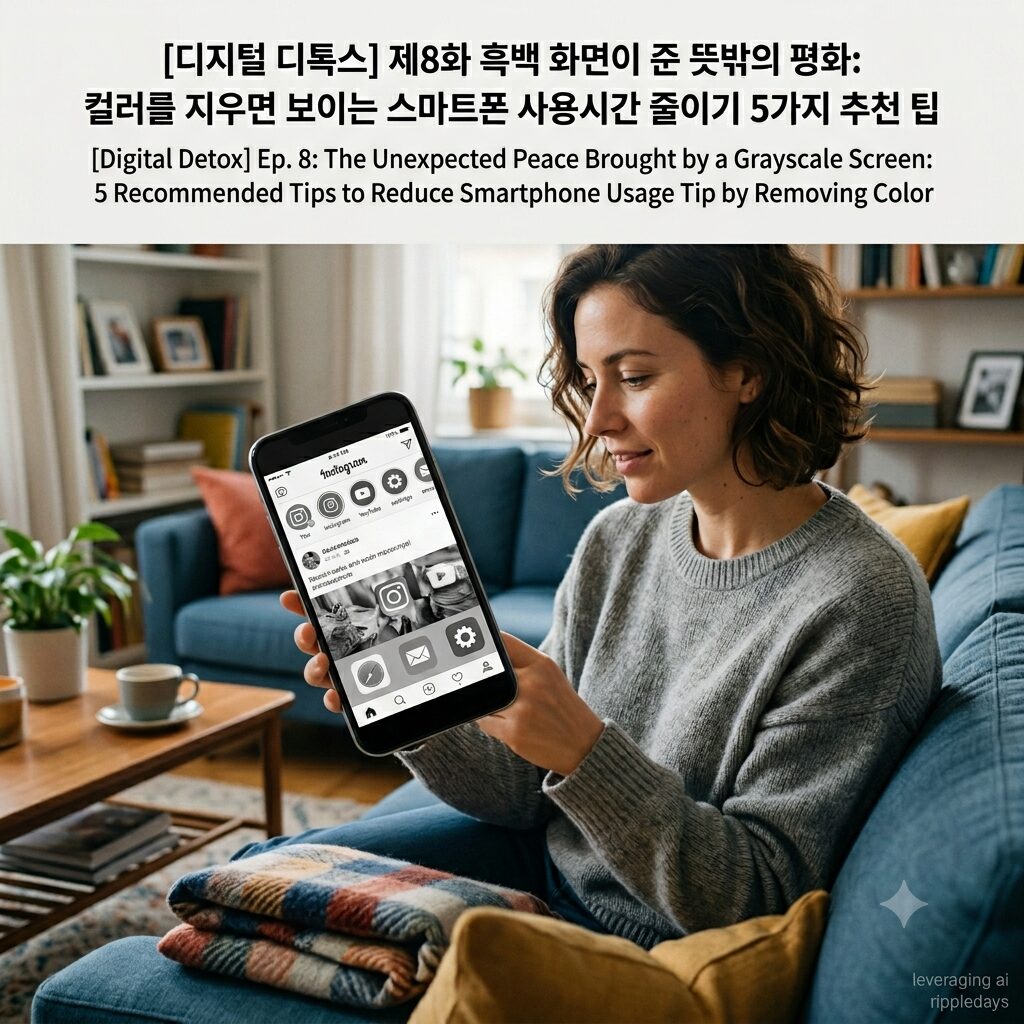
스마트폰 디스플레이의 화려한 색상을 지워내는 화면 흑백 모드와 시각적 자극 차단을 통해 무의식적인 기기 사용을 억제하는 디지털 디톡스가 주목받고 있습니다.
스마트폰 의존도가 심화될수록 뇌는 끊임없이 시각 도파민을 갈구하게 되며 이는 집중력 저하와 미디어 중독이라는 현대인 고질병으로 이어집니다.
본 글에서는 스크린 타임을 획기적으로 통제하고 뇌 휴식을 선물할 수 있는 가장 효과적인 흑백화면 설정 및 활용 팁 5가지를 추천합니다.
화려한 컬러에 현혹된 뇌, 시각적 자극 차단이 필요한 이유
스마트폰 제조업체와 앱 개발사들은 사용자의 시선을 오랫동안 붙잡아두기 위해 인지심리학적으로 가장 자극적인 컬러 마케팅과 UI 디자인을 활용합니다.
화면 흑백 모드를 실행하지 않은 상태의 스마트폰은 뇌의 보상 회로를 자극하여 끊임없이 화면을 켜게 만드는 도파민 중독의 강력한 촉매제 역할을 수행합니다.
인간의 뇌는 붉은색 알림 배지, 화려한 색감의 SNS 피드, 고화질 영상의 색상 자극을 마주할 때 무의식적인 흥분 상태에 빠져들며 기기에 종속됩니다.
이러한 시각 도파민의 과도한 흡수는 단기 기억력을 감퇴시키고 전두엽의 기능을 약화시켜 깊은 사고를 방해하는 치명적인 스마트폰 부작용을 낳습니다.
결과적으로 목적 없이 앱을 켜서 스크롤을 내리는 둠스크롤링에 빠지게 되며 일상의 효율적인 시간 관리가 완전히 붕괴되는 결과를 초래합니다.
스마트폰 중독 해결방안의 핵심은 기기가 주는 시각적 매력도를 인위적으로 떨어뜨려 뇌가 전자기기를 지루한 도구로 인식하게 만드는 것입니다.
디스플레이에서 컬러를 완전히 제거하면 스마트폰은 1990년대의 삐삐나 흑백 전자사전처럼 변모하여 무의식적인 사용 욕구가 기적처럼 가라앉습니다.
우리의 소중한 뇌 건강 관리를 도모하고 스마트폰 사용시간 줄이기를 달성할 수 있는 화면 흑백화면 설정 응용 팁 5가지를 아래에서 소개합니다.
시각 도파민을 차단하는 흑백 화면 활용 팁 Top 5
1. 스마트폰 시스템 설정에서 ‘트리플 클릭’ 흑백 모드 단축키 지정하기
디스플레이 설정을 매번 바꾸는 번거로움을 해결하기 위해 스마트폰 자체 단축키 기능을 활용하여 접근성을 높이는 방법입니다.
아이폰의 ‘손쉬운 사용’이나 가속화된 안드로이드 설정을 통해 전원 버튼이나 홈 버튼을 연속으로 세 번 누르면 화면이 즉시 흑백으로 전환되도록 지정하십시오.
필요에 따라 컬러 화면과 흑백 화면을 빠르게 오갈 수 있도록 환경을 구축해 두면 디지털 디톡스를 지속하는 데 커다란 도움이 됩니다.
- 장단점 요약: 접근 단계를 최소화하여 실용성을 극대화할 수 있는 반면, 단축키가 너무 편리하여 자신도 모르게 컬러 모드로 쉽게 되돌릴 수 있다는 유혹이 존재합니다.
2. 빨간색 앱 알림 배지를 숨기는 ‘알림 아이콘 색상 커스텀’ 병행하기
화면을 완전히 흑백으로 바꾸는 것이 초기 단계에서 너무 답답하게 느껴진다면 앱 아이콘의 자극적인 색상만 먼저 제어하는 방식이 효과적입니다.
런처 앱이나 시스템 테마 설정을 활용하여 앱 우측 상단에 표시되는 강렬한 빨간색 숫자 배지와 아이콘 컬러를 무채색이나 파스텔톤으로 변경하십시오.
진한 붉은색은 뇌에 긴급 상황이라는 신호를 인위적으로 주입하여 스마트폰 의존도를 높이므로, 이 색상만 지워내도 화면 확인 충동이 눈에 띄게 줄어듭니다.
- 장단점 요약: 스마트폰의 미관을 해치지 않으면서도 핵심적인 시각 자극 차단이 가능하지만, 영상이나 사진 소비 시의 도파민 분비를 완전히 막지는 못합니다.
3. 쇼핑 및 SNS 앱 실행 시에만 자동으로 흑백 모드가 켜지는 ‘루틴 자동화’ 설정하기
특정 앱이 유독 스크린 타임을 늘리는 주범이라면 스마트폰 내 자동화 기능(Bixby Routines 또는 단축어)을 활용해 타깃 제어를 하는 팁입니다.
인스타그램, 유튜브, 혹은 쇼핑 앱을 실행하는 순간 스마트폰 디스플레이가 자동으로 흑백 모드로 전환되도록 조건을 설정해 두십시오.
자극적인 상품 사진이나 영상이 순식간에 회색빛으로 변하기 때문에 몰입도가 급격히 떨어져 미디어 중독에서 빠르게 탈출할 수 있도록 유도합니다.
- 장단점 요약: 중독성이 강한 앱만 골라서 집중적으로 스마트폰 사용시간 줄이기를 실천할 수 있으나, 설정 과정이 다소 복잡하다는 단점이 있습니다.
4. 컴퓨터 모니터 및 태블릿 PC까지 모든 스크린 기기로 ‘흑백 영역 확장’하기
스마트폰 화면만 제어하고 아이패드나 모니터의 화려한 색상을 그대로 방치한다면 디지털 웰니스의 균형이 깨지기 쉽습니다.
재택근무를 하거나 공부를 할 때 사용하는 노트북과 태블릿 기기의 그래픽 설정에서도 색상 필터를 활성화하여 전체 작업 환경을 흑백으로 통일하십시오.
모든 스크린 기기에서 화려함이 가라앉으면 정보 과부하가 획기적으로 줄어들어 전두엽 회복이 빨라지고 뇌 휴식의 밀도가 깊어집니다.
- 장단점 요약: 시각 피로도를 극도로 낮추어 업무와 공부 집중법의 효율을 주도하지만, 디자인이나 영상 편집 등 색채 작업이 필수적인 직군에게는 적용이 불가능합니다.
5. 배경화면을 단순한 ‘단색 블랙’으로 지정하여 바탕화면 시각 자극 없애기
스마트폰을 켤 때마다 마주하는 화려한 풍경 사진이나 인물 배경화면은 그 자체로 뇌에 잔잔한 자극을 주어 기기 체류 시간을 늘립니다.
홈 화면과 잠금 화면의 배경을 아무런 무늬가 없는 순수한 검은색(Solid Black) 단색 이미지로 교체하는 아주 단순한 방법입니다.
디스플레이를 켰을 때 아무런 시각적 즐거움도 느껴지지 않는 미니멀한 환경은 스마트폰을 오직 텍스트 기반의 비즈니스 도구로만 인식하게 만듭니다.
- 장단점 요약: 즉각적으로 적용할 수 있으며 배터리 소모량까지 획기적으로 절감할 수 있으나, 스마트폰을 꾸미는 아기자기한 재미는 완벽히 포기해야 합니다.
시각적 자극 차단을 위한 5가지 흑백 활용 방법 한 줄 요약 표
| 추천 방법 | 핵심 메커니즘 | 장점 | 단점 | 추천 대상 |
| 트리플 클릭 지정 | 시스템 단축키 연동 | 컬러/흑백 신속 전환 | 원상복구 유혹 높음 | 디톡스 입문 단계 유저 |
| 알림 배지 색상 변경 | UI 무채색 커스텀 | 폰 본연 기능 유지 | 완벽한 차단 불가 | 직장인 및 비즈니스 유저 |
| 앱별 루틴 자동화 | 특정 앱 진입 시 작동 | 중독 앱 타깃 제어 | 초기 세팅 복잡함 | SNS 숏폼 과의존 유저 |
| 모든 스크린 확장 | 다중 기기 필터 적용 | 정보 과부하 최저화 | 색채 업무자 불가 | 장시간 PC 작업 유저 |
| 단색 블랙 배경화면 | 홈 화면 미니멀화 | 즉각 적용, 배터리 절약 | 시각적 즐거움 소멸 | 무의식적 폰 오픈형 유저 |
ripple point
스마트폰 화면에서 화려한 컬러를 지워내는 순간 전자기기는 나를 유혹하는 놀이터가 아닌 필요할 때만 사용하는 건조한 도구로 되돌아옵니다.
제7화 내 돈 주고 산 스마트폰을 감옥에 가두다: 스마트폰 금욕상자로 의존도를 낮추는 3가지 환경 가이드
Hashtag
#화면흑백모드 #시각적자극차단 #디지털디톡스 #스마트폰중독 #흑백화면설정 #도파민중독 #스마트폰사용시간줄이기 #뇌휴식 #집중력향상 #스크린타임 #스마트폰의존도 #현대인고질병 #디지털웰니스 #미디어중독 #시각도파민 #스마트폰중독해결방안 #스마트폰부작용 #뇌건강관리 #전두엽회복 #시간관리
English Version Available Below
Ep. 8: The Unexpected Peace Brought by a Grayscale Screen: 5 Recommended Tips to Reduce Smartphone Usage Time by Removing Color
Digital detox, which suppresses involuntary device usage through visual stimulus blocking and turning on the grayscale screen mode to wipe out the brilliant colors of smartphone displays, is gaining significant attention.
As smartphone dependency intensifies, the brain continuously craves visual dopamine, which cascades into the common modern ailments of decreased concentration and media addiction.
In this post, we recommend the 5 most effective tips for configuring and utilizing a grayscale screen that can drastically control screen time and gift your brain a true rest.
The Brain Bewildered by Brilliant Colors: Why Visual Stimulus Blocking Is Necessary
Smartphone manufacturers and app developers utilize UI designs and color marketing that are psychologically highly stimulating to capture users’ attention for prolonged periods.
A smartphone that does not implement the grayscale screen mode acts as a powerful catalyst for dopamine addiction, stimulating the brain’s reward circuit and causing users to constantly turn on the screen.
The human brain falls into an involuntary state of excitement and becomes subordinate to the device when facing the color stimuli of red notification badges, brilliant social media feeds, and high-definition video colors.
Such excessive absorption of visual dopamine produces fatal smartphone side effects, including a decline in short-term memory and the weakening of prefrontal cortex functions, which hinder deep thinking.
Consequently, this leads to doomscrolling, where individuals mindlessly open apps and scroll down, resulting in the complete collapse of efficient time management in daily life.
The core of smartphone addiction solutions is to artificially degrade the visual attractiveness provided by the device, making the brain perceive the electronic device as a boring tool.
When color is completely removed from the display, the smartphone transforms into something like a 1990s pager or a grayscale electronic dictionary, and the involuntary desire to use it miraculously subsides.
Below, we introduce 5 tips for configuring grayscale screens to promote our precious brain health management and achieve a reduction in smartphone usage time.
Top 5 Tips for Utilizing a Grayscale Screen to Block Visual Dopamine
1. Assign a ‘Triple-Click’ Grayscale Mode Shortcut in Smartphone System Settings
This method increases accessibility by utilizing the smartphone’s native shortcut feature to resolve the hassle of changing display settings every single time.
Configure your settings through iPhone’s ‘Accessibility’ or accelerated Android settings so that the screen instantly converts to grayscale when the power button or home button is pressed three consecutive times.
Establishing an environment where you can swiftly move between a color screen and a grayscale screen based on necessity serves as a massive aid in sustaining digital detox.
- Pros and Cons Summary: It maximizes practicality by minimizing the access steps, whereas a temptation exists where you can easily revert to color mode unconsciously because the shortcut is too convenient.
2. Combine ‘Notification Badge Color Customization’ to Hide Red App Notification Badges
If completely changing the screen to grayscale feels too frustrating during the early stages, a method that first controls only the stimulating colors of app icons is highly effective.
Utilize launcher apps or system theme settings to change the color of icons and the intense red number badges displayed on the upper right of apps into achromatic or pastel tones.
Deep red color artificially injects a signal of emergency into the brain, increasing smartphone dependency; thus, erasing this color alone noticeably reduces the impulse to check the screen.
- Pros and Cons Summary: It enables core visual stimulus blocking without harming the smartphone’s aesthetic, but it fails to completely stop dopamine release during video or photo consumption.
3. Configure a ‘Routine Automation’ That Automatically Turns on Grayscale Mode Only When Executing Shopping and SNS Apps
If a specific app is the primary culprit behind extending screen time, this tip targets control by utilizing automation features within the smartphone (Bixby Routines or Shortcuts).
Set conditions so that the smartphone display automatically converts to grayscale mode the moment you execute Instagram, YouTube, or shopping apps.
Because stimulating product photos or videos instantly turn into gray tones, immersion drops sharply, inducing a rapid escape from media addiction.
- Pros and Cons Summary: It allows targeted reduction of smartphone usage time by selectively picking highly addictive apps, but it has the disadvantage that the configuration process is somewhat complex.
4. Expand the ‘Grayscale Realm to All Screen Devices’ Including Computer Monitors and Tablet PCs
If you control only the smartphone screen and leave the brilliant colors of an iPad or monitor intact, the balance of digital wellness can easily break.
Activate color filters in the graphic settings of laptops and tablet devices used when working from home or studying to unify the entire working environment into grayscale.
When brilliance subsides across all screen devices, information overload reduces drastically, accelerating prefrontal cortex recovery and deepening the density of brain rest.
- Pros and Cons Summary: It drives the efficiency of work and study focus methods by reducing visual fatigue to the extreme, but application is impossible for professions where color work is essential, such as design or video editing.
5. Erase Home Screen Visual Stimulation by Assigning the Wallpaper as a Simple ‘Solid Black’
Brilliant landscape photos or portrait wallpapers faced every time you turn on the smartphone provide gentle stimulation to the brain by themselves, increasing device stay time.
This is a highly simple method of replacing the backgrounds of the home screen and lock screen with a pure solid black image that contains no patterns whatsoever.
A minimalist environment where no visual pleasure is felt when turning on the display makes the brain perceive the smartphone solely as a text-based business tool.
- Pros and Cons Summary: It can be applied instantly and drastically saves battery consumption, but you must completely give up the cute fun of decorating your smartphone.
A One-Line Summary Table of 5 Grayscale Utilization Methods for Visual Stimulus Blocking
| Recommended Method | Core Mechanism | Pros | Cons | Recommended Target |
| Triple-Click Assignment | System Shortcut Integration | Swift Color/Grayscale Switch | High Temptation to Revert | Users Entering Detox Stages |
| Change Badge Color | UI Achromatic Customization | Maintains Native Phone Features | Complete Blocking Impossible | Corporate & Business Users |
| App Routine Automation | Triggers upon Specific App Entry | Target Control of Addictive Apps | Complex Initial Setup | SNS & Short-Form Over-Reliant Users |
| All Screen Expansion | Multi-Device Filter Application | Lowest Information Overload | Impossible for Color Workers | Users with Long PC Work Hours |
| Solid Black Wallpaper | Home Screen Minimalization | Instant Application, Saves Battery | Extinguishes Visual Pleasure | Unconscious Phone Opening Users |
ripple point
The moment you wipe out brilliant colors from the smartphone screen, the electronic device returns to a dry tool used only when necessary, rather than a playground that tempts you.
Ep. 7: Imprisoning the Smartphone I Bought with My Own Money: 3 Environmental Guides to Lower Dependency with a Smartphone Timelock Safe Box
Hashtag
#grayscalescreenmode #visualstimulusblocking #digitaldetox #smartphoneaddiction #grayscalesettings #dopamineaddiction #reducesmartphoneusagetime #brainrest #concentrationimprovement #screentime #smartphonedependency #modernailment #digitalwellness #mediaaddiction #visualdopamine #smartphoneaddictionsolution #smartphonesideeffects #brainhealthmanagement #prefrontalcortexrecovery #timemanagement