본 글은 한국어로 작성되었으며, 글 하단에서 영문 번역본을 확인하실 수 있습니다.
(Scroll down to the bottom for the English version of this post.)

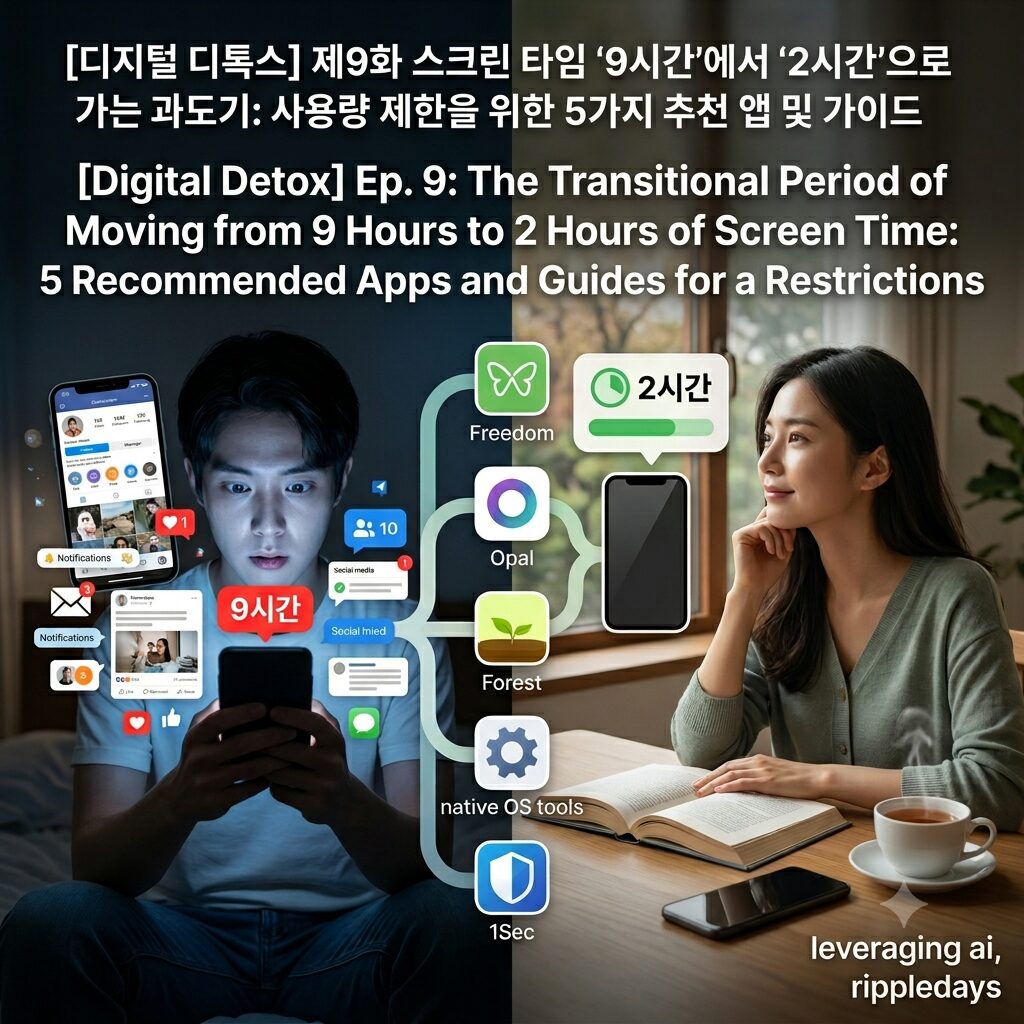
하루 평균 스크린 타임이 9시간에 육박하여 일상의 마비와 집중력 저하를 겪으면서도 스스로 스마트폰 사용량 제한을 하지 못하는 현대인들이 급증하고 있습니다.
스마트폰 의존도가 심화될수록 무의식적으로 앱을 켜는 미디어 중독에 빠지게 되며 이는 도파민 중독과 심각한 뇌 피로를 유발하는 현대인 고질병이 됩니다.
본 글에서는 강제적인 차단 벽을 세워 스마트폰 중독 해결방안을 제시하고 전두엽 회복을 돕는 스크린 타임 줄이기 추천 앱과 가이드 5가지를 추천합니다.
의지력의 한계를 보완하는 기술, 강제적 스크린 타임 추적과 제한의 필요성
많은 현대인이 스마트폰 사용시간을 줄이겠다고 다짐하지만, 스크린 타임 추적 결과를 확인해 보면 하루 8~9시간을 훌륭히 낭비하고 있음에 충격을 받곤 합니다.
인간의 의지력은 유한하기 때문에, 수조 원의 자본을 들여 사용자의 체류 시간을 늘리도록 설계된 글로벌 IT 기업의 알고리즘 유혹을 맨몸으로 이겨내기는 불가능에 가깝습니다.
스마트폰 중독 상태가 장기화되면 뇌는 시각적 자극에만 반응하는 팝콘 브레인으로 변모하고 깊은 사고와 시간 관리를 수행하는 전두엽의 기능이 급격히 퇴화합니다.
이러한 문제를 극복하기 위한 디지털 디톡스의 핵심은 나 자신의 다짐에 의존하는 것이 아니라, 기술을 기술로 제어하는 강력한 앱 차단 프로그램을 도입하는 것입니다.
사용량이 유독 높은 특정 시간대나 앱에 강제적인 벽을 세우면 무의식적으로 스마트폰 화면을 켜서 스크롤을 내리던 강박적 손길을 물리적으로 차단할 수 있습니다.
스크린 타임을 하루 2시간이라는 건강한 수치로 전환하는 과도기 단계에서는 이러한 서드파티 제어 도구들이 무너진 뇌 휴식을 확보하는 가장 완벽한 방어선이 됩니다.
우리의 소중한 디지털 웰니스를 구현하고 스마트폰 부작용에서 벗어나게 해 줄 가장 신뢰도 높은 스크린 타임 줄이기 솔루션 5가지를 아래에서 상세히 소개합니다.
스마트폰 사용량 제한을 위한 추천 앱 및 가이드 Top 5
1. 전 세계 디지털 디톡스 유저들이 가장 신뢰하는 ‘프리덤(Freedom)’ 앱 활용하기
프리덤은 스마트폰뿐만 아니라 태블릿, PC 등 사용자가 보유한 모든 기기의 인터넷 접속과 특정 앱 실행을 동시에 차단해 주는 강력한 크로스 플랫폼 프로그램입니다.
업무나 공부에 몰두해야 하는 시간대를 미리 예약해 두면 그 시간 동안 인스타그램이나 유튜브 등 중독성이 강한 플랫폼으로의 접근이 원천적으로 봉쇄됩니다.
차단된 시간 동안에는 앱을 삭제하거나 설정을 임의로 변경해도 잠금이 풀리지 않는 강력한 ‘고정 모드(Locked Mode)’를 제공하여 확실한 도파민 단식을 보장합니다.
- 장단점 요약: 모든 전자기기의 연동 차단이 가능하여 업무 효율성을 극대화하지만, 영문 인터페이스 중심이며 고성능 기능을 사용하려면 유료 결제가 필수적입니다.
2. 게이미피케이션과 엄격한 세션 제어를 결합한 ‘오팔(Opal)’ 앱 가동하기
오팔은 최근 북미와 유럽의 젊은 층 사이에서 가장 인기를 끌고 있는 세련된 UI 기반의 iOS 및 안드로이드 전용 디지털 웰니스 서비스입니다.
사용자의 스크린 타임을 실시간으로 추적하여 카테고리별 사용 현황을 시각화해 주며, 집중 세션이 시작되면 비필수 앱들의 실행을 완벽하게 마비시킵니다.
특히 자신이 설정한 제한 시간을 지키지 못했을 때 가상의 벌금을 부과하거나 친구들과 함께 디톡스 챌린지를 진행할 수 있어 지속 가능한 습관 형성을 유도합니다.
- 장단점 요약: 직관적이고 세련된 디자인으로 사용의 재미를 더하고 강력한 차단을 지원하나, 타 앱 대비 구독 비용이 다소 비싸다는 진입 장벽이 있습니다.
3. 나무를 키우며 스마트폰 멀리하기를 실천하는 ‘포레스트(Forest)’ 앱 정착하기
포레스트는 스마트폰을 만지지 않는 시간 동안 가상의 앱 화면 속 나무를 심고 키워나가는 독창적인 방식의 스마트폰 중독 해결방안 도구입니다.
사용자가 집중 시간을 설정하고 타이머를 시작하면 나무가 자라기 시작하며, 중간에 스마트폰을 켜서 다른 앱을 실행하면 키우던 나무가 시들어 죽게 됩니다.
스마트폰 사용 제한이라는 부정적인 억제 메커니즘을 ‘나만의 숲을 가꾼다’는 긍정적인 보상 메커니즘으로 승화시켜 청소년 숏폼 중독 예방에도 널리 쓰입니다.
- 장단점 요약: 심리적 거부감 없이 아기자기하게 스마트폰 사용시간 줄이기를 훈련할 수 있지만, 중증 중독자에게는 강제적 차단력이 다소 부족합니다.
4. 제조사가 기본 제공하는 순정 기능 ‘iOS 스크린 타임 & 안드로이드 디지털 웰니스’ 마스터하기
별도의 서드파티 앱을 다운로드하거나 유료 비용을 지불하고 싶지 않다면 스마트폰 운영체제 내에 내장된 순정 제어 시스템을 완벽히 마스터해야 합니다.
앱 시간 제한 메뉴를 통해 하루에 인스타그램이나 유튜브를 사용할 수 있는 최대 시간을 30분에서 1시간 단위로 정교하게 바인딩하십시오.
제한 시간이 초과되면 앱 아이콘이 회색으로 변하며 실행이 차단되는데, 이때 자신만 아는 비밀번호 대신 가족이나 지인에게 암호 설정을 부탁하면 강제성이 배가됩니다.
- 장단점 요약: 운영체제 자체에 내장되어 배터리 소모가 없고 안정적이지만, 마음만 먹으면 ‘오늘 하루 제한 무시’ 버튼을 눌러 쉽게 해제할 수 있습니다.
5. 화면 스크롤링 자체를 무력화하는 무지성 차단 툴 ‘원세컨드(1Sec)’ 도입하기
원세컨드는 앱을 완전히 차단하는 대신 사용자가 SNS나 쇼핑 앱을 터치하여 실행할 때마다 강제로 깊은 호흡을 유도하는 독특한 스크린 타임 줄이기 도구입니다.
앱 아이콘을 누르는 순간 즉시 실행되지 않고 화면에 “숨을 깊게 들이마시세요”라는 문구와 함께 1초에서 5초 동안 숨을 고르는 애니메이션이 재생됩니다.
이 짧은 유예 시간은 무의식적으로 도파민을 찾아 앱을 켜던 뇌의 강박적 회로를 끊어주며, 내가 정말 지금 이 앱을 켜야 하는지 이성적으로 자각하게 만듭니다.
- 장단점 요약: 무의식적인 기기 접근 버릇을 교정하고 생각하는 힘을 기르는 데 탁월하지만, 잦은 화면 지연으로 인해 일상적인 기기 조작 시 답답함을 느낄 수 있습니다.
스크린 타임 사용량 제한을 위한 5가지 솔루션 한 줄 요약 표
| 추천 솔루션 | 제어 메커니즘 | 장점 | 단점 | 추천 대상 |
| 프리덤 (Freedom) | 크로스 플랫폼 전체 잠금 | 모든 기기 동시 통제 가능 | 영문 전용, 유료 구독 | 장시간 PC/기기 작업 직장인 |
| 오팔 (Opal) | 소셜 챌린지 및 강제 세션 | 세련된 UI, 강력한 차단력 | 높은 구독 가격 발생 | 트렌디한 디지털 웰니스 선호자 |
| 포레스트 (Forest) | 게임화 보상 (나무 키우기) | 긍정적 동기부여, 성취감 | 강제적 차단력 미흡 | 학생 및 라이트 중독 유저 |
| 순정 OS 기능 | 시스템 내장 시간 제한 | 추가 비용 없음, 안정성 | 해제가 비교적 용이함 | 가성비 중심의 자기 통제 유저 |
| 원세컨드 (1Sec) | 실행 전 심호흡 유예 시간 | 무의식적 습관 교정 탁월 | 반복 실행 시 답답함 | 습관적 앱 오픈형 둠스크롤러 |
ripple point
스크린 타임을 줄이는 과도기에는 의지력을 믿지 말고 강력한 차단 앱의 벽을 빌려 내 뇌가 무의식적인 도파민 유혹으로부터 단념할 수 있는 환경을 만들어야 합니다.
제8화 흑백 화면이 준 뜻밖의 평화: 컬러를 지우면 보이는 스마트폰 사용시간 줄이기 5가지 추천 팁
Hashtag
#스크린타임 #사용량제한 #디지털디톡스 #스마트폰중독 #스크린타임줄이기 #도파민중독 #스마트폰의존도 #앱차단프로그램 #프리덤앱 #오팔앱 #뇌휴식 #집중력향상 #현대인고질병 #디지털웰니스 #미디어중독 #스마트폰중독해결방안 #스크린타임추적 #전두엽회복 #시간관리 #스마트폰부작용
Ep. 9: The Transitional Period of Moving from 9 Hours to 2 Hours of Screen Time: 5 Recommended Apps and Guides for Usage Restrictions
An increasing number of modern individuals are suffering from the paralysis of daily life and decreased concentration because their average daily screen time approaches 9 hours, yet they fail to implement smartphone usage restrictions on their own.
As smartphone dependency intensifies, individuals fall into media addiction where they mindlessly open apps, turning into a common modern ailment that causes dopamine addiction and severe brain fatigue.
In this post, we present a smartphone addiction solution by establishing compulsory blocking walls and recommend 5 screen time reduction apps and guides that assist with prefrontal cortex recovery.
Technology Complementing the Limits of Willpower: The Necessity of Compulsory Screen Time Tracking and Restrictions
Many modern people vow to reduce smartphone usage time, but they are often shocked to find through screen time tracking results that they are successfully wasting 8 to 9 hours a day.
Because human willpower is finite, it is close to impossible to overcome the algorithmic temptations of global IT corporations designed with trillions of won in capital to increase user stay time with bare willpower alone.
When a state of smartphone addiction is prolonged, the brain transforms into a popcorn brain that reacts only to visual stimuli, and the functions of the prefrontal cortex, which execute deep thinking and time management, rapidly degenerate.
The core of digital detox to overcome these problems is not to rely on one’s own resolutions, but to adopt a powerful app blocking program that controls technology with technology.
Establishing a compulsory wall on specific apps or time frames with high usage can physically block the compulsive hands that unconsciously turn on the smartphone screen and scroll down.
In the transitional stage of converting screen time into a healthy figure of 2 hours a day, these third-party control tools serve as the most perfect line of defense to secure ruined brain rest.
Below, we introduce in detail 5 of the most highly reliable screen time reduction solutions that will implement our precious digital wellness and save us from smartphone side effects.
Top 5 Recommended Apps and Guides for Smartphone Usage Restrictions
1. Utilizing the ‘Freedom’ App, Most Trusted by Digital Detox Users Worldwide
Freedom is a powerful cross-platform program that simultaneously blocks internet access and specific app execution across all devices owned by the user, including smartphones, tablets, and PCs.
If you schedule the timeframes during which you must immerse yourself in work or studies in advance, access to highly addictive platforms such as Instagram or YouTube is fundamentally blocked during those hours.
It guarantees a solid dopamine fast by providing a powerful “Locked Mode” where the lock is not released even if you delete the app or arbitrarily change settings during the blocked duration.
- Pros and Cons Summary: It maximizes work efficiency by enabling interconnected blocking of all electronic devices, but it is centered around an English interface and paid billing is essential to use high-performance features.
2. Running the ‘Opal’ App, Combining Gamification with Strict Session Control
Opal is a digital wellness service exclusive to iOS and Android based on a sophisticated UI that has recently been gaining the most popularity among young people in North America and Europe.
It tracks the user’s screen time in real time to visualize usage status by category, and completely paralyzes the execution of non-essential apps once a focus session begins.
In particular, it induces sustainable habit formation by imposing virtual fines when you fail to keep the restriction time you set or allowing you to proceed with detox challenges together with friends.
- Pros and Cons Summary: It adds the fun of use with an intuitive and sophisticated design and supports powerful blocking, but there is a barrier to entry as the subscription cost is somewhat expensive compared to other apps.
3. Settling on the ‘Forest’ App, Practicing Keeping Away from Smartphones While Growing Trees
Forest is a smartphone addiction solution tool with an ingenious method where you plant and grow virtual trees inside the app screen during the time you do not touch your smartphone.
When a user sets a focus time and starts the timer, a tree begins to grow, and if you turn on the smartphone midway to execute another app, the tree you were growing withers and dies.
It is widely used for preventing youth short-form addiction by sublimating the negative suppression mechanism of smartphone usage restriction into a positive reward mechanism of ‘cultivating my own forest.’
- Pros and Cons Summary: It allows training to reduce smartphone usage time in a cute manner without psychological rejection, but compulsory blocking power is somewhat lacking for heavy addiction users.
4. Mastering Native Features Provided Standard by Manufacturers, ‘iOS Screen Time & Android Digital Wellness’
If you do not want to download separate third-party apps or pay subscription costs, you must perfectly master the native control system embedded within the smartphone operating system.
Finely bind the maximum time you can use Instagram or YouTube in units of 30 minutes to 1 hour per day through the app time limit menu.
When the restriction time is exceeded, the app icon turns gray and execution is blocked; at this time, if you ask a family member or acquaintance to set the password instead of using a password you know yourself, the compulsion is doubled.
- Pros and Cons Summary: Embedded natively in the operating system, it consumes no battery and is stable, but a weakness exists where you can easily deactivate it by pressing the ‘Ignore Limit for Today’ button if you resolve to do so.
5. Adopting the Mindless Blocking Tool ‘1Sec’, Nullifying Screen Scrolling Itself
Instead of completely blocking apps, 1Sec is a unique screen time reduction tool that forces deep breathing every time a user touches and executes social media or shopping apps.
The moment you press an app icon, it does not execute immediately, but an animation for catching your breath for 1 to 5 seconds is played along with the text “Take a deep breath” on the screen.
This brief grace period breaks the brain’s compulsive circuit that mindlessly opens apps searching for dopamine, making you rationally aware of whether you truly need to turn on this app right now.
- Pros and Cons Summary: It is excellent for correcting involuntary device access habits and cultivating the power of thought, but you may feel frustrated during daily device operations due to frequent screen delays.
A One-Line Summary Table of 5 Solutions for Screen Time Usage Restrictions
| Recommended Solution | Control Mechanism | Pros | Cons | Recommended Target |
| Freedom | Cross-Platform Full Lock | Simultaneous control of all devices | English only, paid subscription | Professionals working long hours on PC/devices |
| Opal | Social Challenge & Forced Session | Sophisticated UI, powerful blocking | High subscription price occurs | Preferers of trendy digital wellness |
| Forest | Gamified Reward (Tree Growing) | Positive motivation, accomplishment | Insufficient forced blocking power | Students & light addiction users |
| Native OS Features | System Embedded Time Limit | No additional cost, stability | Relentlessly easy to deactivate | Cost-efficiency focused self-control users |
| 1Sec | Deep Breath Grace Period Before Launch | Excellent correction of involuntary habits | Frustrating during repeated execution | Habitual app-opening doomscrolllers |
ripple point
In the transitional period of reducing screen time, do not trust your willpower; you must borrow the walls of a powerful blocking app to create an environment where your brain can give up involuntary dopamine temptations.
Ep. 9: The Transitional Period of Moving from 9 Hours to 2 Hours of Screen Time: 5 Recommended Apps and Guides for Usage Restrictions
Hashtag
#screetime #usagerestrictions #digitaldetox #smartphoneaddiction #reducescreentime #dopamineaddiction #smartphonedependency #appblockingprogram #freedomapp #opalapp #brainrest #concentrationimprovement #modernailment #digitalwellness #mediaaddiction #smartphoneaddictionsolution #screentimetracking #prefrontalcortexrecovery #timemanagement #smartphonesideeffects