This article was written in English, and you can find the Korean translation at the link below.
(본 글은 영어로 작성되었으며, 아래 링크로 한글 번역글을 확인하실 수 있습니다.)
An increasing number of modern individuals are suffering from fragmented attention spans and severe notification stress due to their failure to implement push notification blocking and turn off app notifications.
As smartphone dependency increases, people experience smartphone side effects such as phantom vibration syndrome, where they feel a vibration even when no communication has arrived.
In this guide, we analyze the impact of notifications on brain fatigue and present three action rules to boost work efficiency by activating focus mode through digital detox.
The Brain Addicted to the “Ding” Sound: Prefrontal Cortex Overload Caused by Notification Stress
We live in a flood of various push notifications that average hundreds of times a day, which causes a serious scientific disruption of attention in the brain.
A smartphone where turning off app notifications is not properly implemented becomes a hotbed of media addiction that constantly stimulates dopamine secretion, making users subordinate to the device.
The “ding” sound or brief vibration instantly hijacks the flow of the brain that was immersed in a task, and it takes an average of 23 minutes to recover that broken concentration.
When this notification stress is repeated, the brain is forced to maintain an alert state at all times, leading to chronic brain fatigue and a severe decline in concentration improvement.
Consequently, this manifests as a common modern ailment where individuals experience phantom vibration syndrome—reaching for their pockets even when there is no stimulus—or experience a sharp drop in work efficiency.
To avoid being governed by smartphones and to regain sovereignty over life, intensive digital detox that completely redesigns the notification environment from a digital wellness perspective is essential.
Since efforts to avoid looking at the screen by willpower alone have limits, the smartphone addiction solution must be systematically settled by controlling the device itself.
Below, we will examine in detail three core action rules for configuring smartphone notification settings and practicing a phone diet that can be immediately applied to daily life.
3 Action Steps to Break Free from the Governance of Notifications and Boost Focus
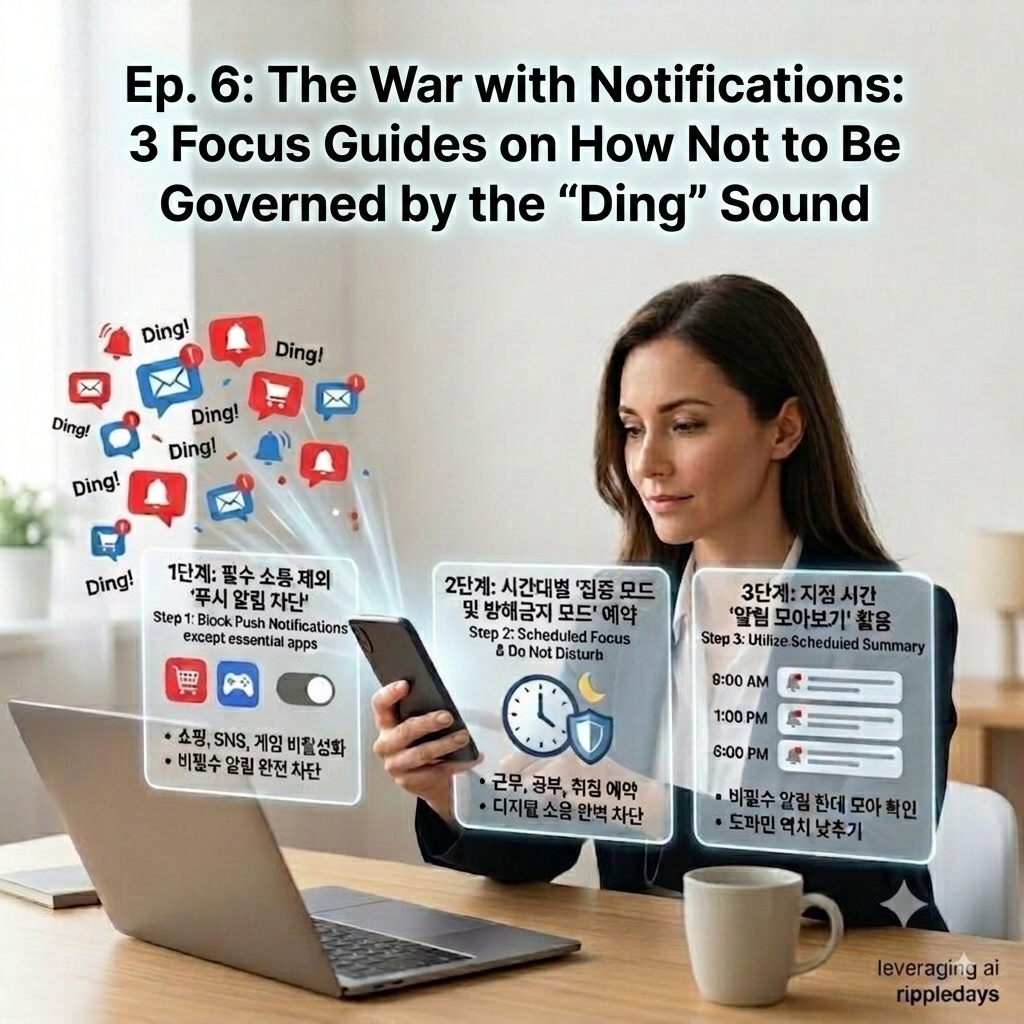
Step 1: ‘Block Push Notifications’ for All Apps Except Essential Communication Apps
Notifications from shopping, gaming, social media, and media apps—excluding work messengers or urgent phone calls—are the biggest factors that stimulate the brain and cause smartphone addiction.
Enter the smartphone settings menu and completely disable notification permissions for all third-party apps that are not directly linked to your survival or livelihood.
Do not stop at simply muting the sound; you must completely block visual stimuli, such as badges appearing on the screen or pop-ups emerging.
Switching to an active consumption structure where you open apps to check information only when you want to can drastically reduce the number of unconscious screen checks and secure brain rest.
Step 2: Schedule ‘Focus Mode and Do Not Disturb Mode’ for Time-Specific Device Control
During working hours, reading hours, and right before bedtime, a clean environment where external digital noise is completely blocked must be established through scheduling features.
Utilize the Focus Mode or Do Not Disturb features inherently provided by smartphones like iPhone or Galaxy to prevent notifications from sounding during specific time frames.
By utilizing the whitelist feature to exceptionally allow contact from designated family members or essential work contacts, you can immerse yourself in daily life without anxiety about emergency situations.
The tranquility guaranteed by the system gathers fragmented attention into one, maximizing work efficiency and cultivating the power of thought to sink into deep contemplation.
Step 3: Utilize ‘Scheduled Summary’ to Gather and Check Notifications Together
The habit of replying in real time to messages that fly in at any moment is a primary culprit of smartphone dependency that degrades work efficiency and pushes the brain into a state of information overload.
Utilize the device’s native features so that non-essential notifications do not sound in real time, but are gathered and displayed only at designated times, such as 9 AM, 1 PM, and 6 PM.
Artificially isolating the cycle of checking notifications allows you to escape the messenger prison and regulate the tempo of your own work and rest.
The phone diet habit of connecting with the digital world only at fixed times lowers the dopamine threshold, contributing decisively to brain health management experienced in daily life.
A 3-Minute Checklist for a Successful Notification Diet
At the end of the day, review the checklist below to check how well you have practiced digital detox today.
- Did you disable more than 90% of push notifications for non-essential apps including social media, shopping, and games, excluding phone calls and essential work messengers?
- Did you actively activate the smartphone’s Focus Mode or Do Not Disturb Mode during times when deep immersion is required, such as working or studying?
- When a notification sound or vibration rang, did you finish the task you were doing and check it with leisure, rather than stopping your work immediately?
- Did you restrain yourself from phantom vibration syndrome—reaching into your pocket or turning on the screen to check even when no notification arrived?
- Instead of replying in real time whenever a message arrived, did you check the messenger and communicate only at specific times you set?
| Recommended Step | Implementation Method | Intended Outcome | Expected Benefit | Target Audience |
| Step 1: Push Block | Turn off third-party app notifications | Active information consumption | Drastic drop in screen checks | Chronic notification checkers |
| Step 2: Scheduled Focus | Auto-activate Do Not Disturb mode | Complete block of digital noise | Maximum work immersion | Professionals & Students |
| Step 3: Summary View | Group notifications at fixed times | Isolation of communication cycles | Lowered dopamine threshold | Real-time reply obsessors |
ripple point
Smartphone notifications are a signal to adjust yourself to other people’s time, not your own. Your intact day truly begins only when you block non-essential notifications.
Hashtag
#appnotificationoff #focusmode #digitaldetox #smartphoneaddiction #smartphonenotification #pushnotificationblocking #brainrest #concentrationimprovement #screentime #smartphonedependency #modernailment #digitalwellness #mediaaddiction #notificationstress #dopamineaddiction #phantomvibrationsyndrome #workefficiency #brainfatiguetreatment #phonediet #smartphoneaddictionsolution